Meta Widget For Blogger
Friday, September 18, 2009
Leave a Comment
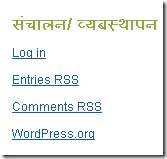 Wordpress has a Meta widget which can be enabled or disabled in the sidebar. The widget makes it easy for users/ boggers to login, logout, link to Wordpress.org etc.
Blogger does not have such options in it's bundled design and if you want to log in to your own dashboard while viewing any blog pages you can use the "Blogger Navbar".
If you were thinking of using some widgets like the Wordpress's Meta Option, and didn't wanted to use any kind of third party scripts or code, here is a easy way:
First login to your Blogger Dashboard using your user name and password and go to: Layout>>Page Elements
 Here click on "Add a Gadget" and select "HTML/JavaScript" scrolling the available gadgets under "Basic" section.
When the "Configure HTML/JavaScript" box appears, just fill the following text inside it:
<ul>
<li><a href="http://www.blogger.com/home">Login</a></li>
<li><a href="http://www.blogger.com/logout.g">Logout</a></li>
<li><a href="http://www.blogger.com/create-blog.g">Create Blog</a></li><li><a href="https://www.google.com/accounts/ManageAccount?hl=en">My Account</a></li></ul>
Hi I dont speak english, but I try. Look! I`m interesting for you previous blogger template. WPMax for Blogger. Answer me how could get it. Please...My email is fsfreddy@yahoo.es . I expect for you answer..Bye
Hola amigo...soy peruano y hablo español. Me interesa la anterior plantilla que usabas para tu blog, contactame por favor para poder negociar. Saludos , mi email es fsfreddy5@yahoo.es
ok i will provide you that template.leave me your email address